.png)
Event Setup
2 - 12 months from event
Auction & Guest Management
1 week - 2 months from event
Create Raffle Tickets, Sign Up Parties, or Heads and Tails
Create and Schedule Text Messages
Send Text Messages and Emails directly from HelloFund for more engagement with your attendees.
TIP: Start sending texts or emails 3–4 days before your event. You can schedule them in advance — we recommend 30 days out so you can set it and forget it.
Create and Schedule Text Messages
Bidders > Text Bidders
-
Add a Notification Contact to enable automated messages
-
Select a Filter
(Ex: All Bidders) -
Set Auto Send to Yes and choose the send time
-
Enter your message and select Save to Composed Texts Messages
(160-character limit)

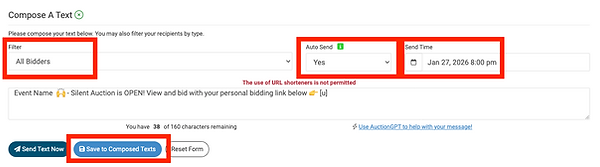
Important: Send a test text to yourself before messaging your entire community. Scroll down to Send a Single Text and enter your bidder number or name.

In September 2025, Dress for Success Austin implemented HelloFund's Text Message for their annual Little Black Dress Soiree. As a result, their Silent Auction revenue grew increased by 72%.
Check out these proven text messages to increase silent auction revenue, streamline check-in and check-out, and simplify post-event payments. Simply copy and paste the text below to get started.
4 Days - 1 Day from Event Night
1st Message [4 Days from Event Day at 4:30 PM]
Filter [All Bidders]
Org Name Event Name is this Thursday! You will receive important text updates for the event from this number. See you soon!
2nd Message [4 Days from Event Day at 8:00 PM]
Filter [All Bidders]
Event Name 🙌 - Silent Auction is OPEN! View and bid with your personal bidding link below 👉[u]
3rd Message [2 Days from Event Day at 8:00 PM]
Filter [All Bidders]
Have you grabbed your raffle ticket 🎟️ yet? Don’t miss out on a trip to the Bahamas for 4 days / 3 nights - get yours today! [insert direct link to raffle]
4th Message [1 Day from Event Day at 3:00 PM]
Filter [All Bidders with No Card on File]
Event Name - Pre-register your credit card securely here 🙌 - [u]
5th Message [1 Day from Event Day at 8:00 PM]
Filter [All Bidders]
Event Name - Preview our amazing 🔥 Live Auction items now. 30A 🏖️ Getaway, 🥃 House and more [u]
Event Day / Night
6th Message [Event Day at 3:00 PM]
Filter [All Bidders with No Card on File]
Speed up Check-In for Event Name—securely add your card here: [u]
Welcome Text*
[Event Day Auto Message Sent at Check-In]
Welcome to Annual 💃🏻 Soiree! [t]. Check out the🍷 toss and auction now [u]
Update the custom welcome text message under Software Settings > Auction Settings > Butler Settings. The [t] code tells guests which table they’re seated at.
7th Message [Event Day at 8:00 PM]
Filter [All Bidders]
Silent Auction ends at 8:45 PM CST tonight. Get your final bids in now and help us meet our goal 👉[u]
Silent Auction Winning Text Message
[Auto Sends when Auction closes]
You WON! 🙌 Pay from your phone here and head over to check out to pick up your item (s) 👉 [p]
*To update, go to Software Settings > Auction Settings > Payment. Scroll down to Silent Auction Winning Text Messages and ensure that it is set to Yes.
Day after Event