.png)
Event Setup
2 - 12 months from event
Auction & Guest Management
1 week - 2 months from event
Create Raffle Tickets, Sign Up Parties, or Heads and Tails
Send Email Reminders to Sponsors and Table Hosts
Use this section to learn how to send email reminders to sponsors and table hosts so they can update their guest information prior to your event.
TIP: HelloFund recommends starting these emails about 4 weeks before event night, with up to 3 reminder emails total.
Send Email Reminders
Event Tickets > View Ticket Sales
Use this section to send email reminders to sponsors or table hosts.
To Send an Email Reminder to update Guest Info
-
Go to Event Tickets > View Ticket Sales
-
Search by Last Name
-
Select the green Edit (pencil) icon next to the name


4. Scroll down to review which names, email addresses, and phone numbers are still missing
5. If multiple guests need to be updated, choose one of the following options:
-
Option 1 (recommended): Send the email directly from HelloFund by scrolling back up and selecting the blue drop down arrow, then, select the link button to resend email

Email Sent to Sponsors / Table Hosts
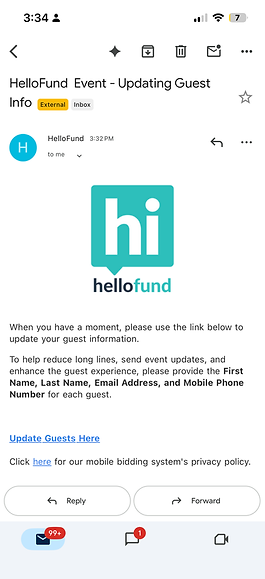
Update the Guest Update Link Email Message
Event Tickets > Ticket Page Settings > Customizable Content > Guest Update Link Email Message
Recommended Text for Guest Update Link Email Message:
When you have a moment, please use the link below to update your guest information.
To help reduce long lines, send event updates, and enhance the guest experience, please provide the First Name, Last Name, Email Address, and Mobile Phone Number for each guest.
Screenshot of the Guest Update Link when selected

When Update Guests Here is selected, a new tab will open. Once sponsors or table hosts save their updates, the guest information will automatically be saved in HelloFund.
-
Option 2: Copy the Unique Guest Link and send an email manually from your own email account
Unique Guest Link

Add or Remove Guests from Sponsor / Table Host
Event Tickets > View Ticket Sales
-
Search by Last Name
-
Select the green Edit (pencil) icon next to the name
-
Scroll to the bottom of the page
-
To add a guest, select the blue Add Guest button
-
To remove a guest, select the red X to delete the guest
